- Home
- Blog
- Salesforce
- Salesforce Database and Custom Settings

- Apex Class in Salesforce
- Approval Process In Salesforce
- Step By Step Guide to Becoming a Certified Salesforce Developer
- Bulkification in Salesforce
- Code Coverage In Salesforce
- Context Variables In Salesforce
- Controller Extension in Salesforce
- Controlling the program flow in Salesforce
- How To Create Data Modeling In Salesforce?
- Custom Controller in Salesforce
- Custom Reports In Salesforce
- DML Operations In Salesforce
- Top 10 Features of Salesforce Lightning
- Governor Limits in Salesforce
- How Salesforce Certification Can Boost Your Career?
- Salesforce Lookup Relationship
- Master-detail Relationship in Salesforce
- User Management And Object Level Security In Salesforce
- Price Book in Salesforce CPQ
- Product Bundle in Salesforce CPQ
- Quote Line Editor In Salesforce CPQ
- Why Learn Salesforce?
- Record Level Security In Salesforce
- Report Building in Salesforce
- Salesforce Automation Testing With Selenium
- Salesforce Collection of Map
- Salesforce Collection of Set
- Salesforce CPQ Implementation Guide
- Salesforce CPQ Tutorial
- How to create dashboard in Salesforce
- Salesforce Developer Certification, Jobs And Salary Trends
- An Overview of Salesforce Development Environment
- Salesforce Interview Questions
- Salesforce Lightning Interview Questions
- Salesforce Lightning Tutorial
- Salesforce Enhances Its Marketing Cloud With AI And Google Partnership
- Salesforce Job Roles And Certifications
- Salesforce Tutorial
- Salesforce vs ServiceNow
- Salesforce Vs Siebel CRM'S
- Access Specifiers in SalesForce Cloud Computing - Salesforce
- An Introduction to Exception Handling – SalesForce
- An Introduction to Visualforce – SalesForce
- An Overview of Salesforce Security
- Annotation in SalesForce
- Classes, Inheritance and Overriding in SalesForce
- Configuring Salesforce Web-To-Lead Form
- Creating Visualforce Page using AJAX Programming - Salesforce
- How to Create Field Dependence in SalesForce
- How to Create Sample Apex Trigger in SalesForce
- How to Define Validation Rules in SalesForce
- Object Relationships Overview – SalesForce
- SalesForce Integration and Environment in Cloud Computing
- SalesForce Deployment and Assertions
- Shallow copy and Deep Copy in Cloud Computing - Salesforce
- Security and Audit Trail in Salesforce
- Salesforce SOQL
- SOSL Of Salesforce
- Standard Controller In Salesforce
- Test Class in Salesforce With Example
- Testing APEX In Salesforce
- Time Dependent Workflow Rule - Action
- Trigger Scenarios in Salesforce
- What is CRM? - A Complete Beginners Tutorial
- What is Salesforce Administrator?
- What is Salesforce CRM?
- Why You Should Learn Salesforce Skills
- Workflow Rules In Salesforce
- Configuring Tasks in Workflow Rules
- How to call APEX Class
- Context Variables
- Configuring Email alert in Workflow Rules
- Salesforce Web Services
- Salesforce Vlocity Interview Questions
- Salesforce CPQ Interview Questions
- Visualforce Interview Questions
- Salesforce Tools
- Salesforce Integration Interview Questions
- Custom Settings in Salesforce
- What is Salesforce Database?
- Salesforce Data Loader
- Salesforce Platform Events
- What is Salesforce Marketing Cloud - Definitive Guide
- Bucket Field In Salesforce - Bucket Column Salesforce
- What is Junction Object In Salesforce?
- Sharing Rules in Salesforce
- What is Salesforce Architecture?
- Salesforce Projects and Use Cases
- Salesforce Marketing Cloud Integration
- Microsoft Dynamics VS Salesforce
- Salesforce Admin Projects and Use Cases
- Salesforce Apex Tutorial
- Salesforce Apex Development Tutorial
- Apex Testing and Deployment
- Salesforce Data Operations
- Salesforce Security
- Salesforce Data Modeling and Relationships
- Salesforce Integrations
- Salesforce Reporting and Data Loader
- Salesforce Career Guidance
- Salesforce Comparisons
- Salesforce Administrator Tutorial
- Salesforce Automation: Workflow Rules, Approval Processes, Governor Limits, and Bulkification
- Salesforce Development
- What is Salesforce Agentforce
- Salesforce Agentforce vs Salesforce Service Cloud
- Salesforce Agentforce Architecture
Salesforce is a company that offers businesses many powerful customer relationship management (CRM) tools. These tools help businesses strengthen customer engagement to new heights. You can manage customer data effectively, perform in-depth analytics, and derive useful insights using Salesforce.
The Salesforce database helps businesses manage customer interactions and data. It provides insights into customer behaviour, buying patterns, and interests. It empowers Salesforce professionals to personalize marketing campaigns and drive business growth.
This blog explores the fundamentals of the Salesforce database, its architecture, custom settings, Salesforce migration, and related concepts in detail.
Let’s dive right in.
Table of Contents:
- What is Salesforce?
- Salesforce Architecture – An Overview
- Salesforce Database – An Introduction
- SOQL - An Overview
- Salesforce Migration
- How to Manage Data Transfer in the Salesforce Database?
- Custom Settings in Salesforce
- Frequently Asked Questions
What is Salesforce?
Salesforce is a cloud-based software platform that businesses use to communicate effectively across teams, improve customer relationships, and enhance the user experience. This tool enables sales, commerce, marketing, and IT teams to collaborate on a single platform.
With Salesforce, you can see all customer data in a single view. This tool's underlying AI capabilities help you make informed and accurate decisions. Using this tool, you can track customer journeys from start to finish, personalise customer engagement, and more.
As a result, teams can efficiently share information, improve collaboration, and optimise productivity.
Salesforce Architecture – An Overview
In its basic form, Salesforce architecture is a multi-tenant system built from a series of interconnected layers. This architecture shares database resources with all its tenants and stores data securely. It offers an easy-to-use interface that lets users operate Salesforce software effortlessly.
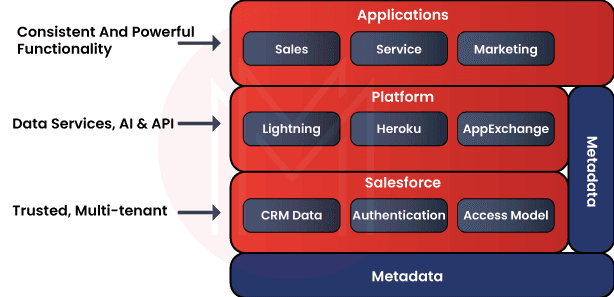
Since the Salesforce database operates on a multi-tenant architecture, data is logically separated but physically shared among tenants. It uses an object-based data model that aligns with relational database structures.
Among many layers of the Salesforce architecture, the Salesforce platform layer serves as its foundation. This layer is powered by metadata and includes vital components such as data services, AI services, and APIs.
Here, metadata consists of custom setups, scripts, and functions. It helps access data from databases quickly. APIs help to communicate with other systems. The top layer of the architecture consists of Salesforce Apps, such as Sales, Service, and Marketing.
| Enrolling in professional "Salesforce Certification Training" can help you gain practical knowledge, earn certifications, and boost your career opportunities. |
Salesforce Database - An Introduction
Data storage is crucial for storing customer data and sales journeys. The Salesforce database is a relational database that efficiently stores and retrieves customer data.
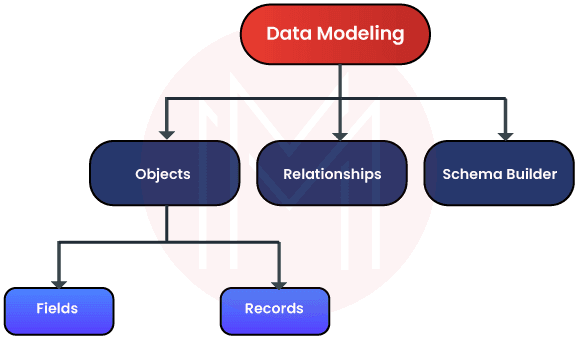
You can access customer data in tables in the Salesforce database. Data includes names, email addresses, contact numbers, and sales history. The Salesforce database delivers reliability, security, and flexibility to users.
Moreover, the functionality of the Salesforce database remains unaffected even when application scaling varies. It also remains balanced regardless of the changes in the data storage and processing power.
In short, the Salesforce database is the relational database used to store customer data and their applications.
1. Data Modelling Components of the Salesforce Database
Objects, Relationships, and Schema Builder are the three crucial components of data modelling in the Salesforce database.
Let's learn them one by one below:
- Objects
Objects are tables in the Salesforce database. Three types of objects are used in the Salesforce database: standard, custom, and external.
-
- Standard objects are the prebuilt objects used in the database. The prebuilt objects are named Account, Contact, and Lead.
- Custom objects are the ones you can create to meet business needs. For example, if you are in the retail industry, you can create an object like ‘orders’. Custom objects provide custom layouts that help build analytic functions and reporting in the objects.
- External objects, the third one, support mapping data outside the Salesforce database.
Know that every object in the Salesforce database consists of records and fields. The rows of tables are called records, and the columns are called fields.
-
- Fields
Standard objects include three prebuilt fields. Similarly, custom objects also consist of standard fields. The standard fields are known as identity, name, and system.
-
-
- Identity is one of the essential components of the Salesforce database. Every record in an object will have a field containing a unique identifier for that record.
- Name is another standard field with the record's name. Sometimes, it can be a number too.
- System is a read-only field. It will show the identity of the person who last modified the data in the record.
-
In addition to the three standard fields, every object will include fields such as checkboxes, dates, formulas, and numbers.
-
- Records
The Salesforce database allows you to create records for objects once you have finalised the required fields for those objects. For example, suppose you need to insert a new customer into the customer table in the database. In that case, you can create a new customer record in the customer table.
- Relationships
As you know, Salesforce follows a relational database structure. So, you can link multiple tables in a Salesforce database together and easily share information. Note that you need to set up relationships for both custom objects and standard objects.
Relationships in the Salesforce database help establish connections between records and enable data sharing across objects.
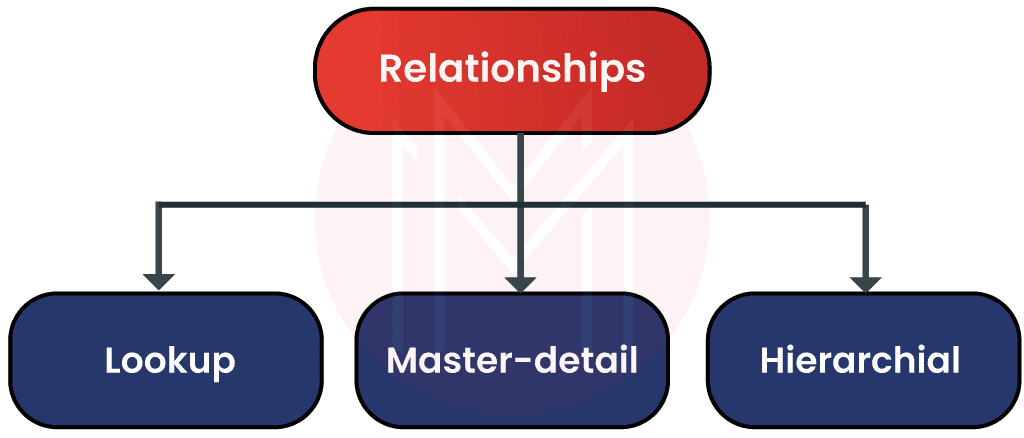
There are three types of relationships in the Salesforce database: Look-up, Master-detail, and Hierarchical. Let’s have a look at them below:
-
- Lookup:
This relationship represents a relationship between two objects in the Salesforce database. In this type, one object looks up another based on their relation. So, you can use a look-up relationship only when two tables are related based on certain aspects.
-
- Master-detail:
In this relationship, one object serves as the master, and the other as the detail. The master object can control the behaviours of the detail object. For instance, who can view the detailed object data can be decided by the master object.
The master-detail relationship is complex. If you delete the master object, the related detail records will also be deleted.
You can use the master-detail relationship when the relationship is always one-to-many. But you can use lookup relationships only when objects are related.
-
- Hierarchical:
This relationship type is exclusive to user objects and helps establish management hierarchies between users.
- Schema Builder
You can use this tool to visualise, understand, and edit data models. You can also create fields and objects using the schema builder. With this tool, you can quickly brief team members about the customisations you have made in the Salesforce software. Besides, you can clearly see how data flows through systems using this tool.

2. Keys used in the Salesforce Database
You can use primary and composite keys to identify records in the Salesforce database. Let’s briefly look at them below:
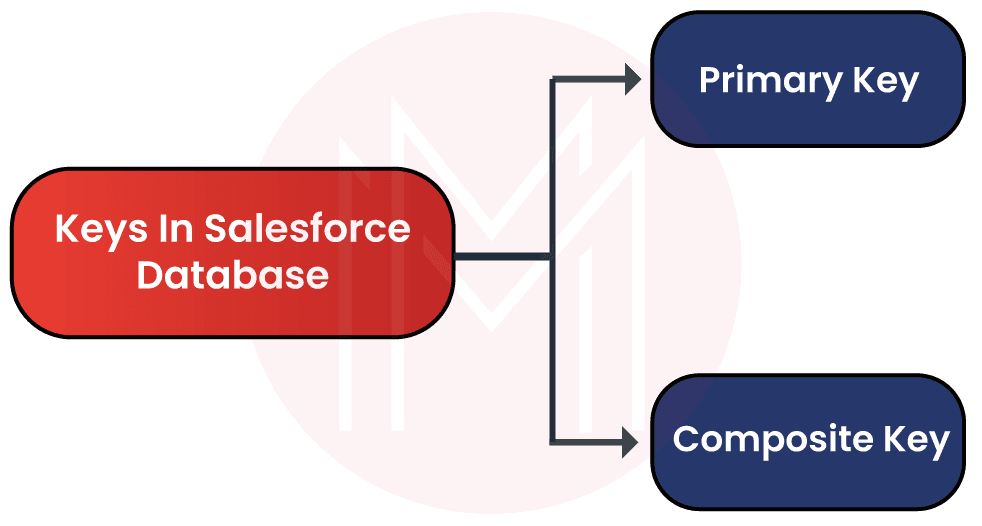
- Primary Key:
A primary key is a column in a table that serves as the unique identifier for locating records in a database. Choosing a primary key is crucial because it determines how records are added or updated in tables.
For example, consider the Salesforce database. A customer's phone number can serve as the primary key for identifying a customer record in a table.
- Composite Key:
If no single column serves as a primary key, you can combine multiple columns to create a composite key.
SOQL – An Overview
Do you wonder how to retrieve data from the Salesforce database? The answer is simple – SOQL.
SOQL refers to Salesforce Object Query Language. You can use this language to access data from an object stored in the Salesforce database. You can also use this language to retrieve data from more than one object.
However, the objects must be related to one another in a specific way. Besides, you can count and sort data using this language.
Let’s understand more about the SOQL.
- SOQL is similar to SQL but designed only to operate with the Salesforce database.
- It helps retrieve data from multiple objects.
- You can specify source objects, conditions for choosing records, and a summary of fields to retrieve from the objects. But you cannot use SOQL to perform complex join operations.
- SOQL can be combined with SOSL, which is Salesforce Object Search Language. Essentially, SOSL works based on the search index. When used together, they yield the best results.
- You can also use SOQL with filtering statements to retrieve data from the Salesforce database.
- It supports counting the number of records that meet the given criteria.
- It allows sorting query results.
Now that you have clearly learned the capabilities of SOQL and how it helps developers manage databases.
Salesforce Migration – A Deep Dive
Data migration is the process of transferring data from one system to another. In Salesforce, it involves moving data from the Salesforce database to external systems. External systems can include databases, applications, data warehouses, and more.
The problem with data migration is that moving a large amount of data may not be accurate or complete. Thankfully, Salesforce migration addresses this common setback and ensures accurate, reliable data transfer.
Salesforce effectively supports org migration. Let’s see what org migration is.
- Org Migration:
In Salesforce, an org is the virtual space where you can store customer data and their applications. Org migration is the process of moving an org from one Salesforce instance to another.
Know that a System of Records (SOR) is used to store metadata and customer data. You can store customer data in SOR by copying from relational databases, FileForce, and NoSQL Databases.
Moreover, you can use the org migration tool to move one Salesforce SOR to the target SOR. You cannot use standard migration tools to migrate data from the Salesforce database to other systems.
That’s because Salesforce comes with multi-tenant architecture. But the ‘custom data copy’ tool can be used to migrate data. This tool can run seamlessly on Salesforce application servers.
FileForce is also known as Keystone. It consists of a store for extents and a metadata catalog. Here, the metadata catalogue is stored as tables in the Salesforce database. NoSQL database is also known as HBase.
The migration between two HBases is performed in two stages.
- In the first stage, the data being moved from one HBase cluster to another is available on the target HBase system.
- In the second stage, data copying begins. Actually, it is a long process, and the time required to complete it depends on the data size.
How to Manage Data Transfer in the Salesforce Database?
Salesforce offers many efficient tools for importing and exporting data.
Let’s explore them below.
- Importing Data:
You can import external data into the Salesforce database using two methods: the Data Import Wizard and the Data Loader.
-
- Data Import Wizard:
This tool allows you to import objects such as contacts, accounts, and leads into custom objects in the Salesforce database. Using this tool, you can import over 50,000 records simultaneously.
It provides an easy-to-use interface to specify configuration parameters, field mappings, and data sources. Here, field mappings map field names from the imported file to those in the Salesforce database. You can use this tool if you don't want to automate the importing process. - Data Loader:
When the data import wizard tool doesn’t support importing data, you can use the Data Loader. You can import over 5 million records at a time using this tool. Here, the data can be of any type, and the source can be any database connection.
You can use the GUI or the command-line window to operate this tool as needed. Above all, you can automate the import process using API calls.
- Data Import Wizard:
- Exporting Data:
Similar to importing, you can export data automatically or manually. Two methods are used to export data from the Salesforce Database: data export services and the Data Loader.
The Data Export Service is browser-based. You can access this service using the setup menu. You can use this tool to export data weekly or monthly.
Custom Settings in Salesforce
Many preconfigured features of Salesforce enable admins to work faster and more efficiently. Custom Settings in Salesforce is one among them.
Salesforce's custom settings enable users to create custom datasets or subsets, making data more accessible.
You can automatically retrieve specific data from records using custom settings. This process is entirely different from that used to create record types and page layouts.
Let’s explore more about the Salesforce custom settings.
Anyone can easily access data using custom settings. To provide quick access in Salesforce, it builds customized data chunks based on user requirements and stores them in the application cache.
There is no need to run an SQL query; any data in custom settings can be retrieved without using SOQL (Salesforce Object Query Language). Once relevant business information and processes can't fit into the existing Salesforce objects, custom objects will be designed exclusively for you by Salesforce developers.
They may even be described as cost-effective extensions of Salesforce CRM's services to meet its customers' needs.
- Types of Salesforce Custom Settings
In Salesforce, there are primarily two types of custom settings.
-
- List custom settings
- Hierarchy custom settings

1. List custom settings
The main goal of this configuration is to cache the necessary data. This implies that having access to pertinent data is advantageous. Additionally, no SOQL queries will be used.
Data from the profile and customer-owned users is roughly comparable to the data used in the list's custom configuration.
All divisions of the respective client organization can use the data. A set of reusable static data, accessible across the organization, is made available to Salesforce developers and agents via a custom list configuration.
For entries that are frequently used in the primary Salesforce Application, this adjustable setting is more effective.
2. Hierarchy Custom Settings
The custom hierarchy setting has the greatest benefit to users, even if the custom list setting includes all the qualities of the custom object and all the disadvantages of the custom setting.
These custom settings use effective hierarchical logic to let users change specific settings and link required lines to the appropriate profiles and contacts, as the client's business requires.
The user is presented with the most precise and accurate result after the Hierarchy Custom Setting has fully searched the client organization, the necessary configuration files, and various individuals with assigned responsibilities. Custom values are intended to be displayed at the bottom of the hierarchy.
- Why do you need custom settings?
Consider this real-time scenario. In a library, a customer requests one of the most popular books. The librarian must frequently visit that row to retrieve the book, which is a tedious task.
Instead, he builds a column where the most prominent collection of books is kept next to his desk, providing a sort of personalised environment that makes the book accessible.
Basically, this is how Custom Settings operate. Data can be saved in the application cache using Custom Settings, simplifying data retrieval.
- Pros and Cons of Custom Settings in Salesforce
- Pros:
- No prior knowledge of SOQL (Salesforce Object Query Language) or any other query is necessary.
- Custom settings are immediately saved to the application's cache, resulting in faster data access and improved performance.
- By providing separate data for different users and roles, the Hierarchical Custom Settings help the company maintain data integrity.
- Cons:
- Data in Custom settings cannot be migrated directly. The data must be downloaded, then moved using a Salesforce Data Loader or other migration software.
- More than 300 custom setting fields are not permitted; they will not be accepted.
- Custom settings count toward the total number of Salesforce's custom objects.
- In Custom Settings, tabs such as the Account and Contact tabs and others cannot be added.
- You can use Salesforce's custom metadata to tackle all of these problems in Custom Settings.
- Pros:
On the whole, you have learned how Salesforce's Custom Settings function and how to use them in practical situations. You have also discovered how List Custom Settings and Hierarchy Custom Settings differ.
Frequently Asked Questions
If you're preparing for Salesforce roles, it’s also helpful to go through these comprehensive Salesforce interview questions to understand real-world questions asked in interviews.
1. What are the main products of Salesforce?
Ans: Salesforce Sales Cloud, Salesforce Service Cloud, Salesforce Marketing Cloud, Salesforce Commerce Cloud, Salesforce Data Cloud
2. Is it easy to learn Salesforce?
Ans: Yes, you can learn Salesforce easily. If you are familiar with key business operations such as sales, marketing, commerce, and service, it will help you learn Salesforce more easily.
3. Is Salesforce a CRM or ERP?
Ans: Salesforce is primarily a CRM platform. You can integrate Salesforce with ERP systems if needed.
4. Is Salesforce a good career option?
Ans: Of course. Salesforce is widely adopted by major companies worldwide, which in turn creates countless job openings offering competitive salaries. According to AmbitionBox, Salesforce administrators at the beginner level can earn up to 6 LPA in India. They can earn up to 155,000 USD in the USA, according to ZipRecruiter.
5. What are the available Salesforce certifications?
Ans: Salesforce offers many certifications for various roles, including:
- Salesforce Certified Agentforce Specialist
- Salesforce Certified Application Architect
- Salesforce Certified JavaScript Developer
- Salesforce Certified Sales Foundations
Conclusion
Let’s wrap up! We hope this blog has provided you with a comprehensive overview of the Salesforce database, its architecture, data migration, custom settings, and more. It will help you efficiently manage data and configure applications in real-time CRM environments.
If you wish to learn more about the Salesforce database and custom settings, you can step into MindMajix. By the end of the training, you will gain a comprehensive understanding of Salesforce and advance your career quickly.
 On-Job Support Service
Online Work Support for your on-job roles.

Our work-support plans provide precise options as per your project tasks. Whether you are a newbie or an experienced professional seeking assistance in completing project tasks, we are here with the following plans to meet your custom needs:
- Pay Per Hour
- Pay Per Week
- Monthly
| Name | Dates | |
|---|---|---|
| Salesforce Training | Sep 19 to Oct 04 | View Details |
| Salesforce Training | Sep 22 to Oct 07 | View Details |
| Salesforce Training | Sep 26 to Oct 11 | View Details |
| Salesforce Training | Sep 29 to Oct 14 | View Details |