
- Introduction to Amazon Elastic File System
- Amazon On-Demand Instance Pricing
- AWS Kinesis
- Amazon Redshift Tutorial
- Amazon SageMaker - AIs Next Game Changer
- AWS Console - Amazon Web Services
- AWS Architect Interview Questions
- AWS Architecture
- Amazon Athena
- Top 11 AWS Certifications List and Exam Learning Path
- How to Create Alarms in Amazon CloudWatch
- AWS CloudWatch Tutorial
- Introduction To AWS CLI
- AWS Configuration
- AWS Data Pipeline Documentation
- AWS EC2 Instance Types
- AWS Elastic Beanstalk
- AWS Elastic Beanstalk Available in AWS GovCloud (US)
- AWS Free Tier Limits and Faq
- AWS EC2 Instance Pricing
- Choosing The Right EC2 Instance Type For Your Application
- AWS Interview Questions and Answers
- AWS Key Management Service
- AWS Lambda Interview Questions
- AWS Lambda Tutorial
- What Is AWS Management Console?
- Complete AWS Marketplace User Guide
- AWS Outage
- AWS Reserved Instances
- AWS SDK
- What is AWS SNS?
- AWS Simple Queue Service
- AWS SysOps Interview Questions
- AWS vs Azure
- AWS Vs Azure Vs Google Cloud Free Tier
- Introduction to AWS Pricing
- Brief Introduction to Amazon Web Services (AWS)
- Clean Up Process in AWS
- Creating a Custom AMI in AWS
- Creating an Elastic Load Balancer in AWS
- How to Deploy Your Web Application into AWS
- How to Launch Amazon EC2 Instance Using AMI?
- How to Launch Amazon EC2 Instances Using Auto Scaling
- How to Sign Up for the AWS Service?
- How to Update Your Amazon EC2 Security Group
- Process of Installing the Command Line Tools in AWS
- Big Data in AWS
- Earning Big Money With AWS Certification
- AWS Certification Without IT Experience. Is It Possible?
- How to deploy a Java enterprise application to AWS cloud
- What is AWS Lambda?
- Top 10 Reasons To Learn AWS
- Run a Controlled Deploy With AWS Elastic Beanstalk
- Apache Spark Clusters on Amazon EC2
- Top 35 AWS Services List
- What is Amazon S3? A Complete AWS S3 Tutorial
- What is AMI in AWS
- What is AWS? Amazon Web Services Introduction
- What is AWS Elasticsearch?
- What is AWS ELB? – A Complete AWS Load Balancer Tutorial
- What is AWS Glue?
- AWS IAM (Identity and Access Management)
- AWS IoT Core Tutorial - What is AWS IoT?
- What is Cloud Computing - Introduction to Cloud Computing
- Why AWS Has Gained Popularity?
- Top 10 Cloud Computing Tools
- AWS Glue Tutorial
- AWS Glue Interview Questions
- AWS S3 Interview Questions
- AWS Projects and Use Cases
- AWS VPC Interview Questions and Answers
- AWS EC2 Tutorial
- AWS VPC Tutorial
- AWS EC2 Interview Questions
- AWS DynamoDB Interview Questions
- AWS API Gateway Interview Questions
- How to Become a Big Data Engineer
- What is AWS Fargate?
- What is AWS CloudFront
- AWS CloudWatch Interview Questions
- What is AWS CloudFormation?
- What is AWS Cloudformation
- Cloud Computing Interview Questions
- What is AWS Batch
- What is AWS Amplify? - AWS Amplify Alternatives
- Types of Cloud Computing - Cloud Services
- AWS DevOps Tutorial - A Complete Guide
- What is AWS SageMaker - AWS SageMaker Tutorial
- Amazon Interview Questions
- AWS DevOps Interview Questions
- Cognizant Interview Questions
- Cognizant Genc Interview Questions
- Nutanix Interview Questions
- Cloud Computing Projects and Use Cases
- test info
- AWS Server and Administration
- AWS vs Alternatives
Organisations are increasingly moving to cloud computing to reduce the burden of building and maintaining physical IT infrastructure. This helps them reduce costs and significantly improve productivity.
Mordor Intelligence projects that the cloud computing market will reach $3.16 trillion by 2032, opening up new job opportunities. AWS is one of the most widely used cloud computing platforms worldwide.
This tutorial explores AWS in detail.
Table of Contents
- AWS Overview
- AWS Account Setup
- AWS CLI Installation on Windows
- AWS CLI Installation on macOS
- AWS Compute and Storage Services
- AWS Database Services
- Generative AI on AWS
- AWS Monitoring and Audit Services
- AWS Infrastructure as Code (IaC) Services
- AWS Security
- AWS Pricing
- AWS Certification Path
- FAQs
- Conclusion
AWS Overview- Getting Started
AWS provides users with on-demand infrastructure, database services, storage, security, networking, analytics, and AI services over the internet.
The following are AWS products across different categories:
| Category | AWS Services |
| Compute | Amazon EC2, Amazon ECS, AWS Lambda, and Amazon EKS |
| Storage | Amazon S3, Amazon EBS, and Amazon EFS |
| Networking | Amazon Route 53, Amazon VPC, and AWS Direct Connect |
| Databases | Amazon RDS, DynamoDB, Amazon Aurora, and Amazon Redshift |
| Monitoring | Amazon CloudWatch and AWS CloudTrail |
| Security | AWS IAM, AWS WAF, AWS Shield, AWS KMS, and AWS Secrets Manager |
| Infrastructure as Code (IaC) | AWS CloudFormation and AWS CDK |
| AI and Machine Learning | Amazon Bedrock and Amazon SageMaker |
Let’s first understand the key components of AWS:
- Users: Individual identities that can access AWS resources.
- Roles: Identities that provide temporary permissions to users, applications, and AWS services. Roles don't require long-term credentials.
- Groups: Collections of users that share common permissions.
- Authentication: The process of verifying the identity of a user or application.
- Policies: JSON documents that define which actions you can perform on specific AWS resources and what you cannot do.
- Root User: The original identity of an AWS account. Protect it with MFA and use it only for tasks that require root access.
- Data Centres: They house the servers and storage systems that make up the cloud platform.
- Virtual Machines: They run on data centre servers that you can access from anywhere.
- Security Groups: Virtual firewalls that control network traffic to and from instances.
AWS Account Setup
You can create an AWS account by following these steps:
1. Signing up
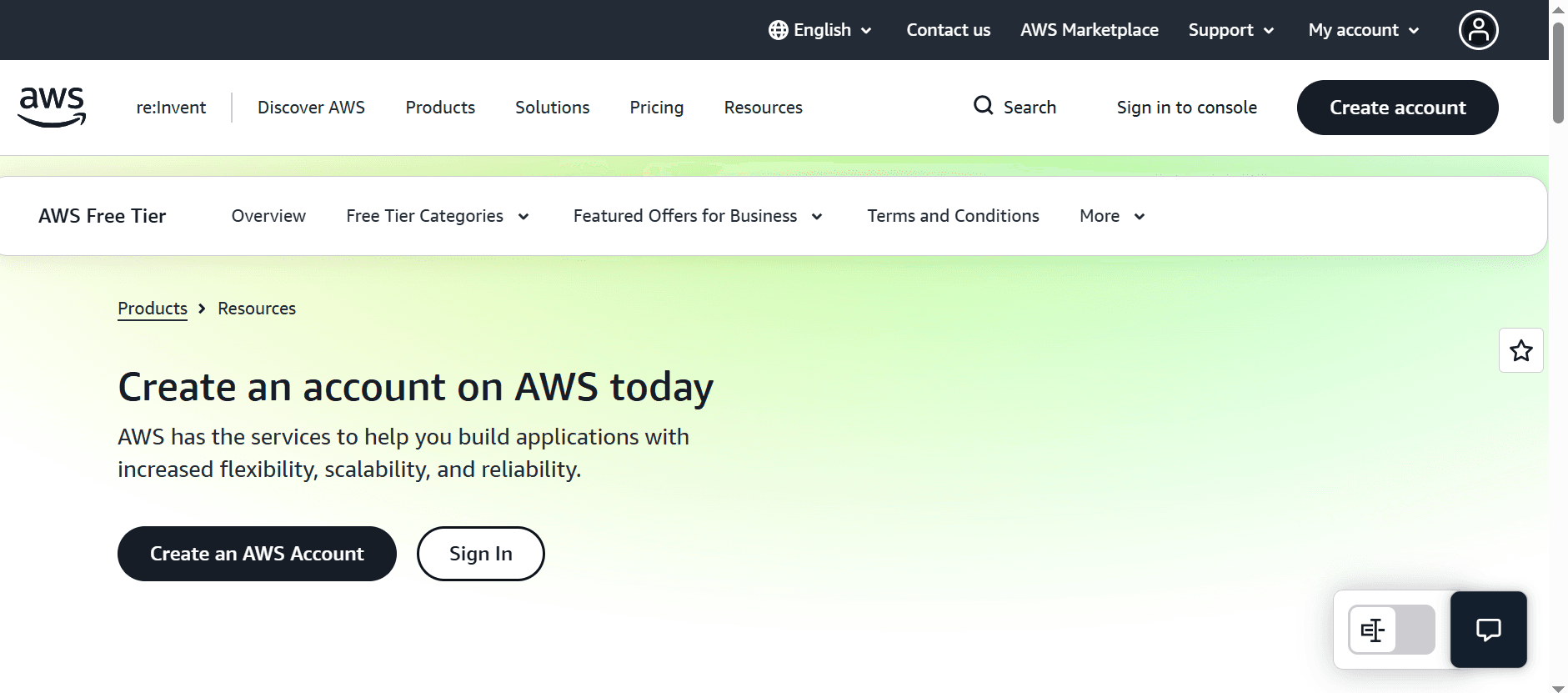
- First, go to the AWS sign-up page.
- Click the ‘Create an AWS account’ button.
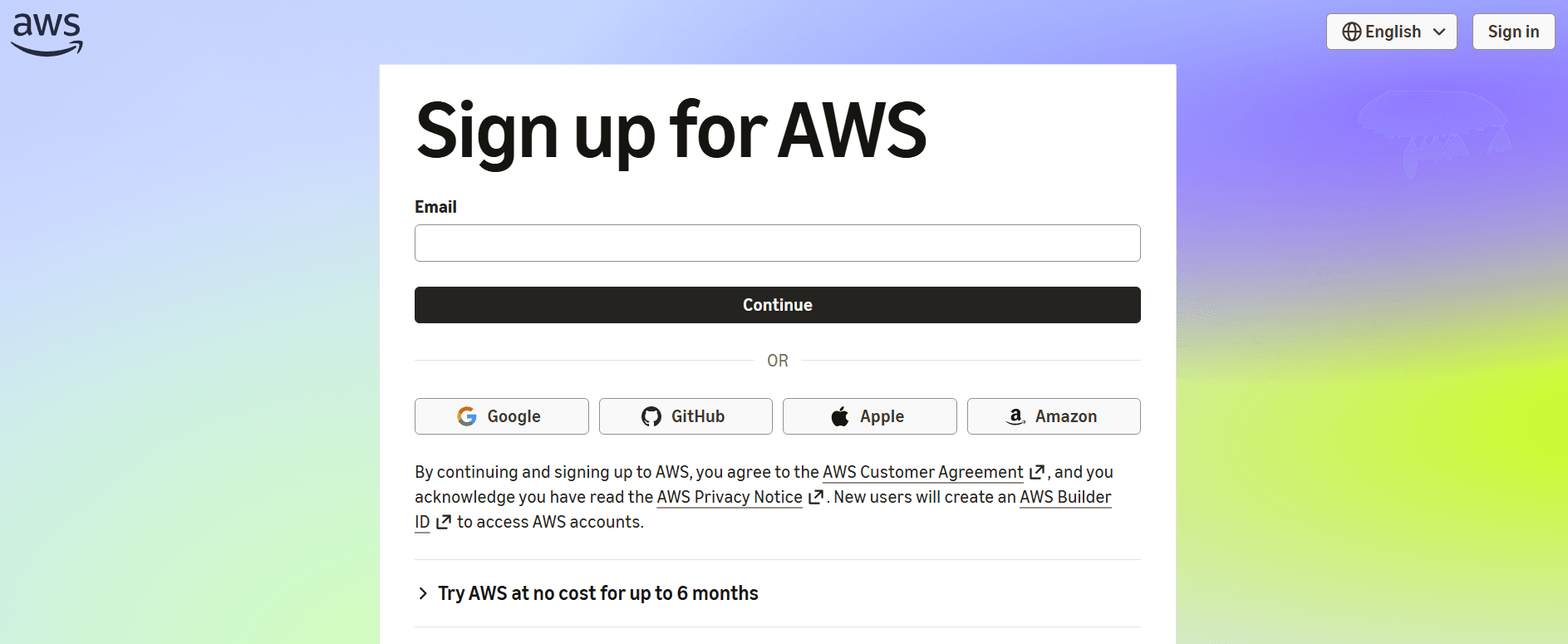
- Enter your email address and click Continue.
- You can sign up with your Google, GitHub, Apple, or Amazon account.
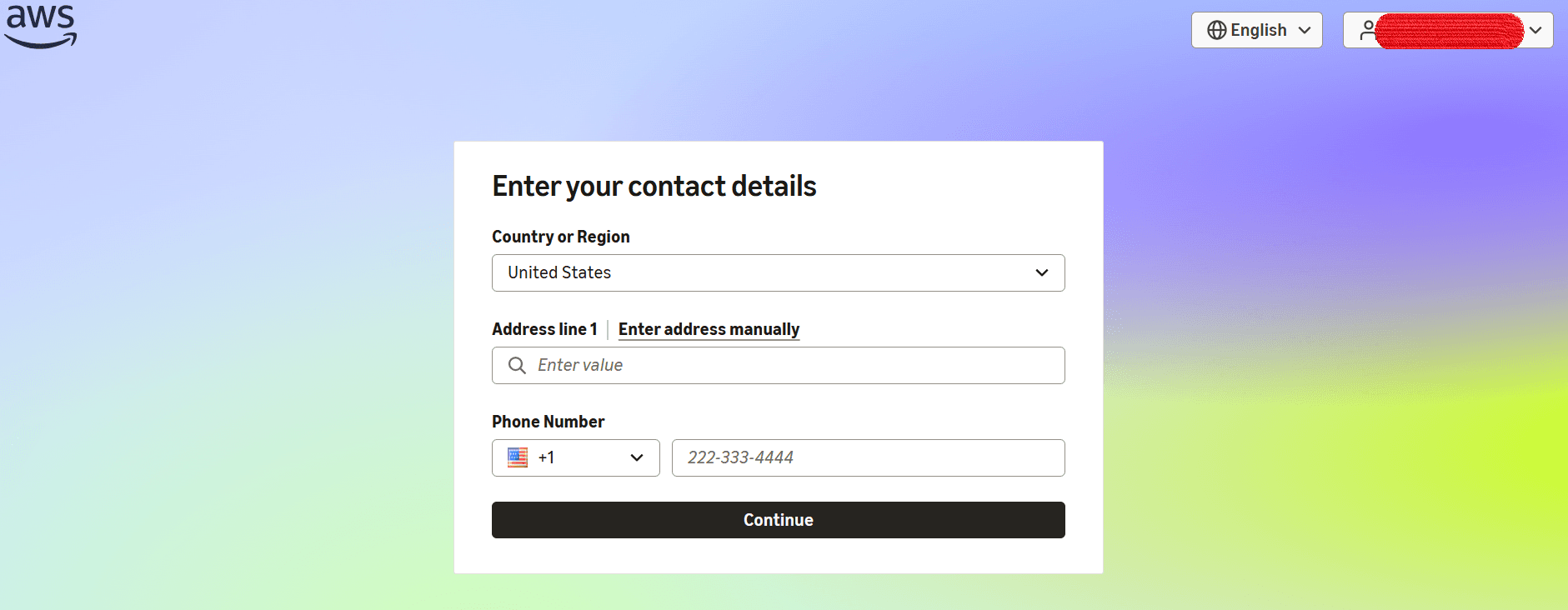
2. Verifying Identity
- Enter your contact details, including your address and phone number:
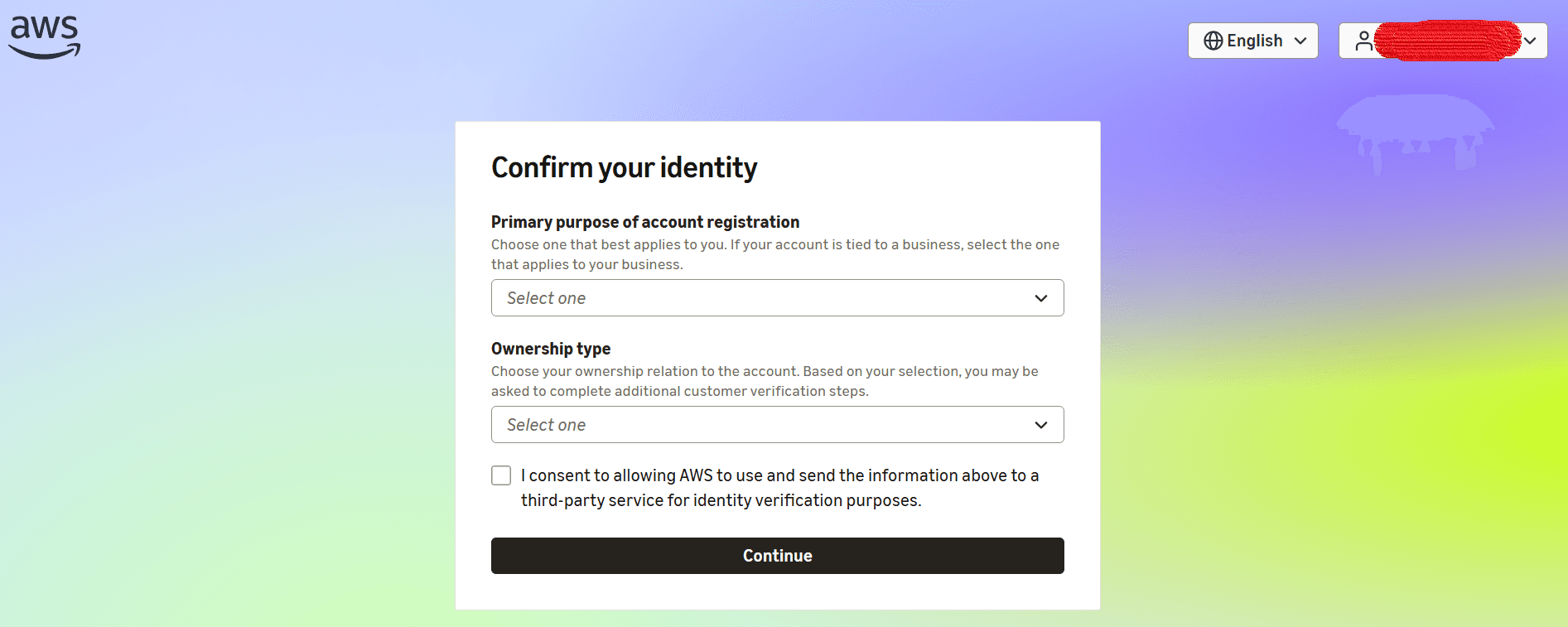
- Provide the purpose of creating the account and select the appropriate ownership type. Confirm your identity by providing the required information and uploading the relevant documents.
- Once complete, AWS creates your account. You are ready to build your first project.
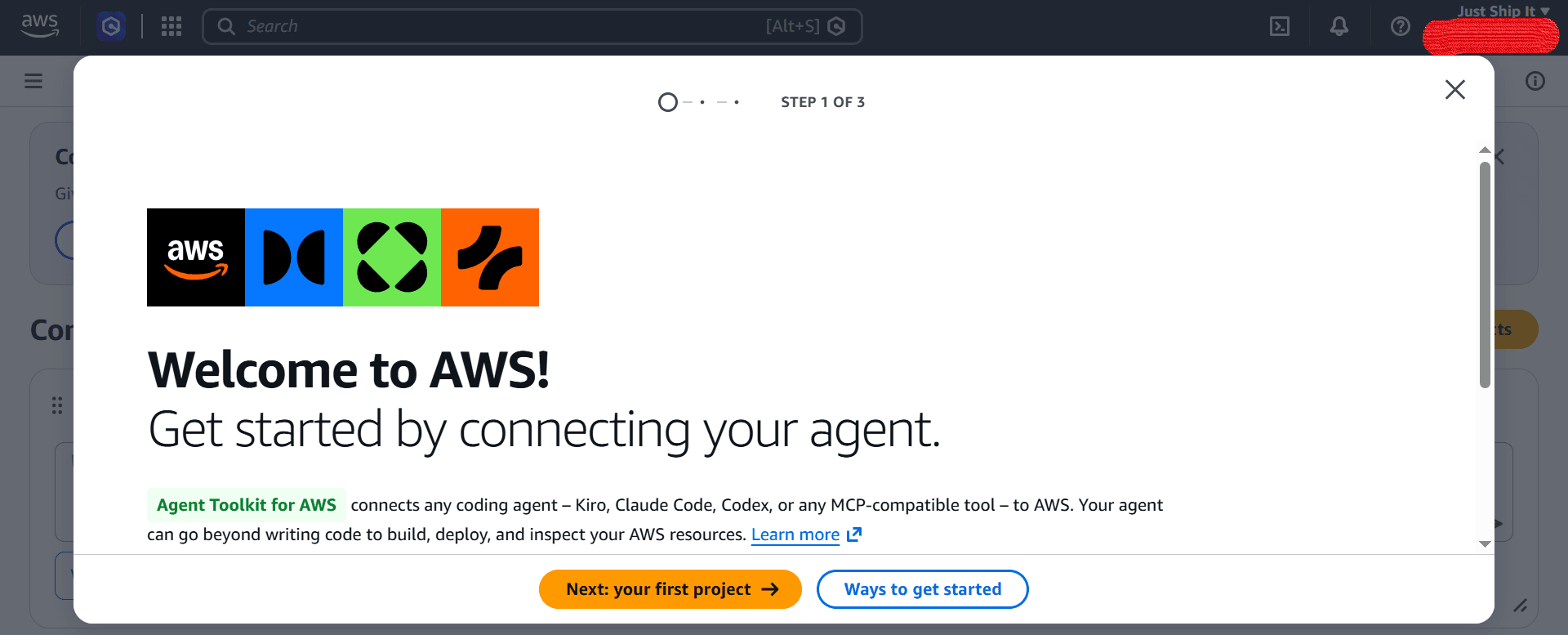
3. Access to AWS Management Console
- Click the ‘Ways to get started’ button to begin your project.
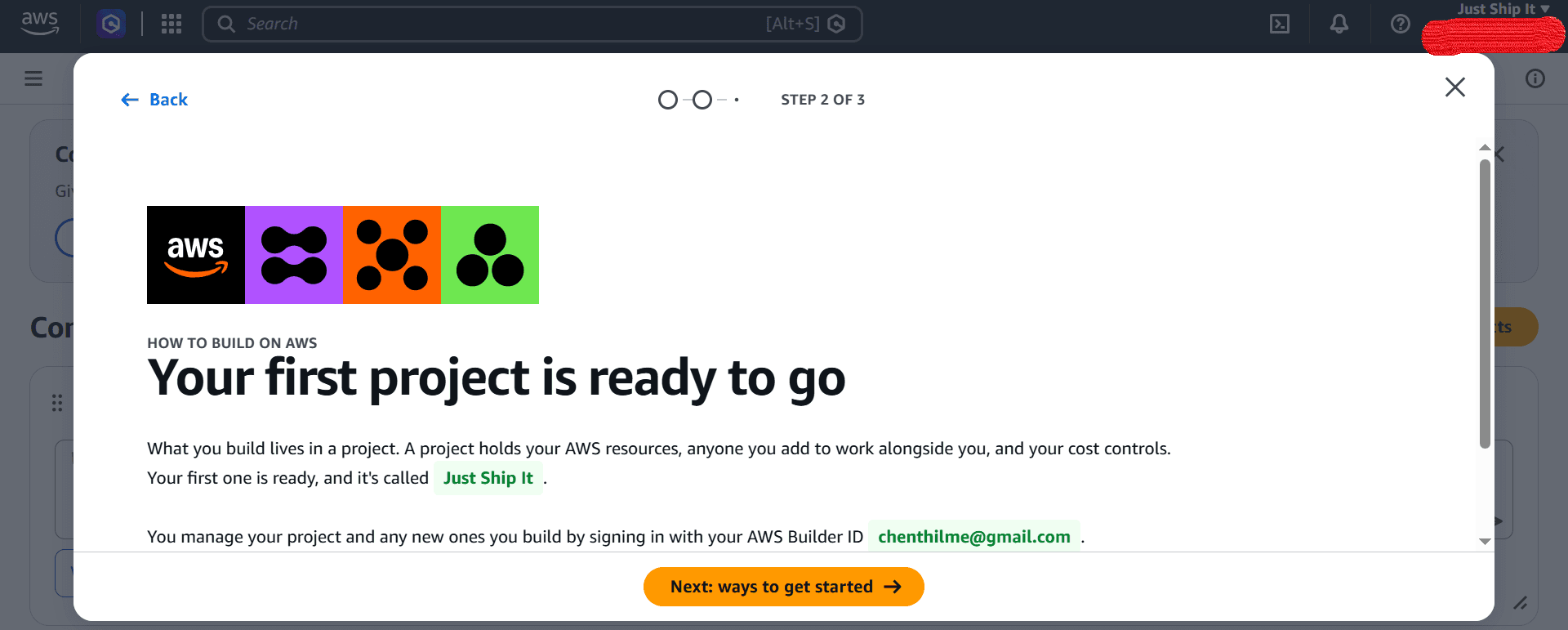
- Choose what you want to create with AWS.
- You are now in the AWS Management Console.
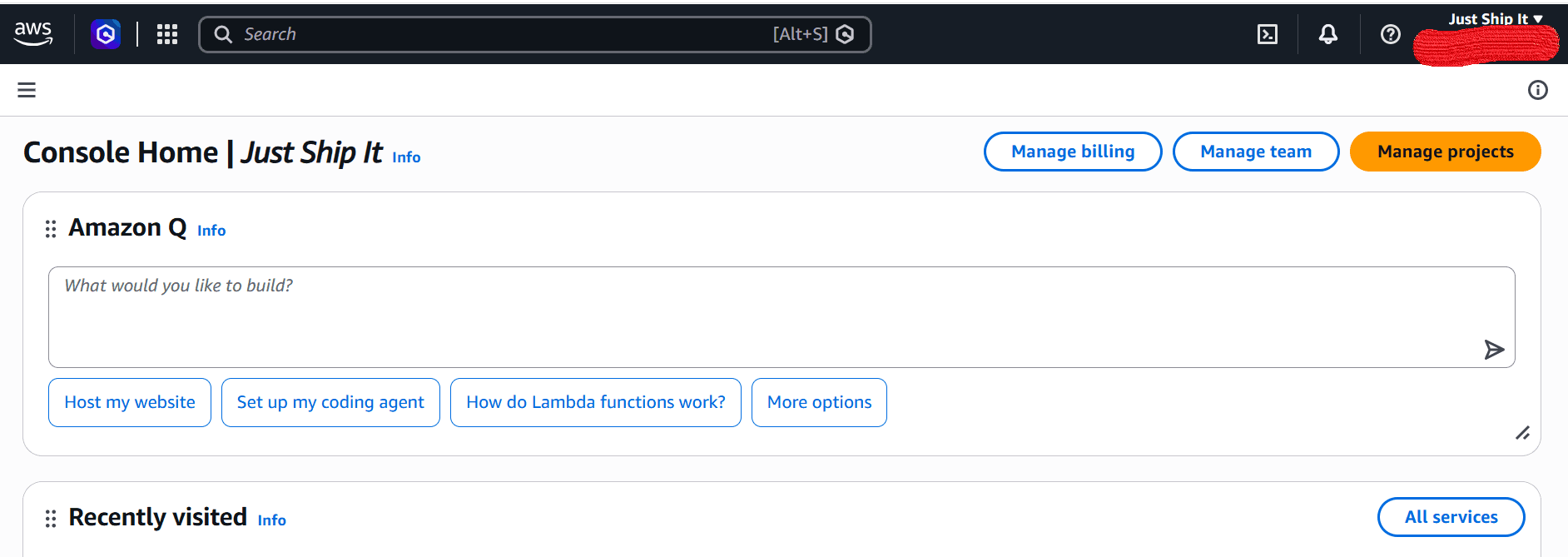
4. Building Your First Project
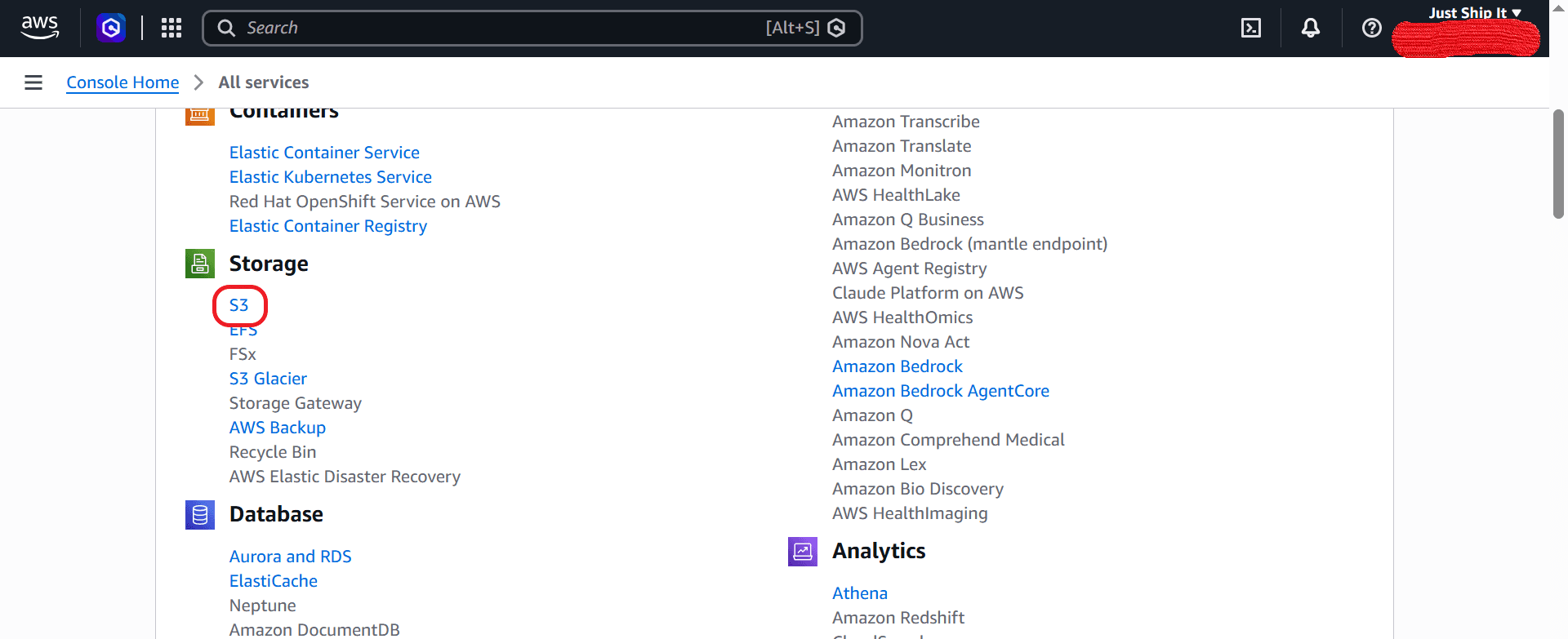
- Click ‘All services’ to select the required AWS service.
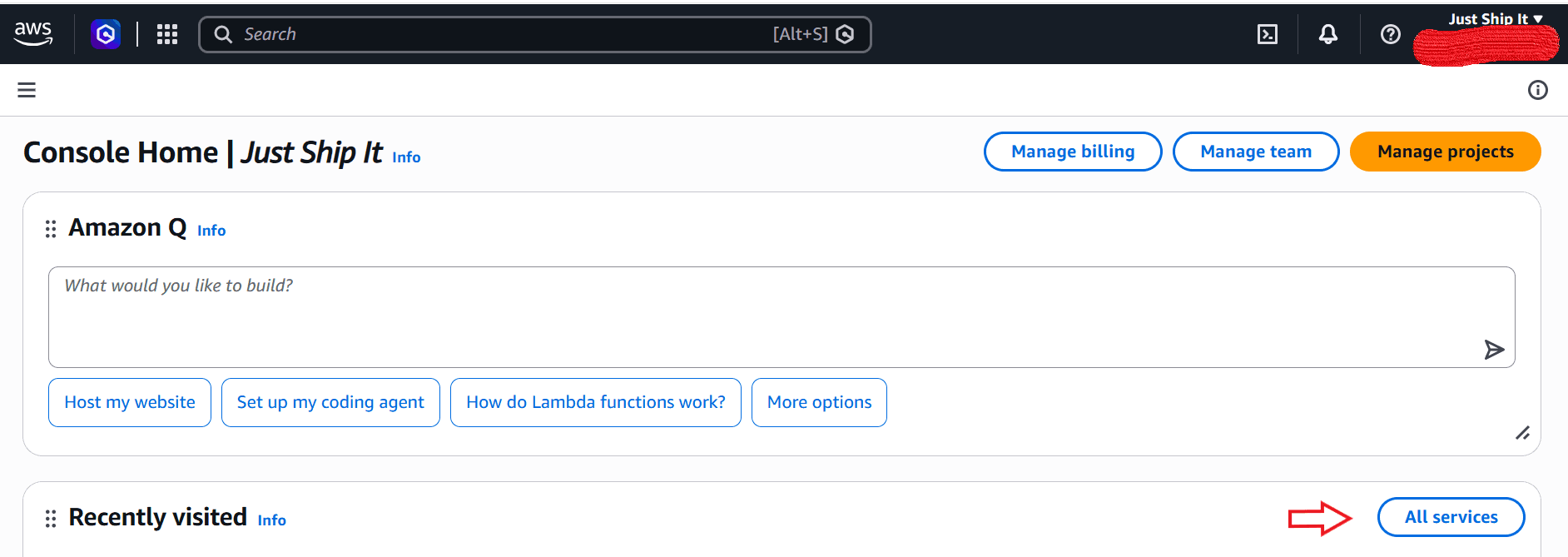
- Click Amazon S3 to store data.
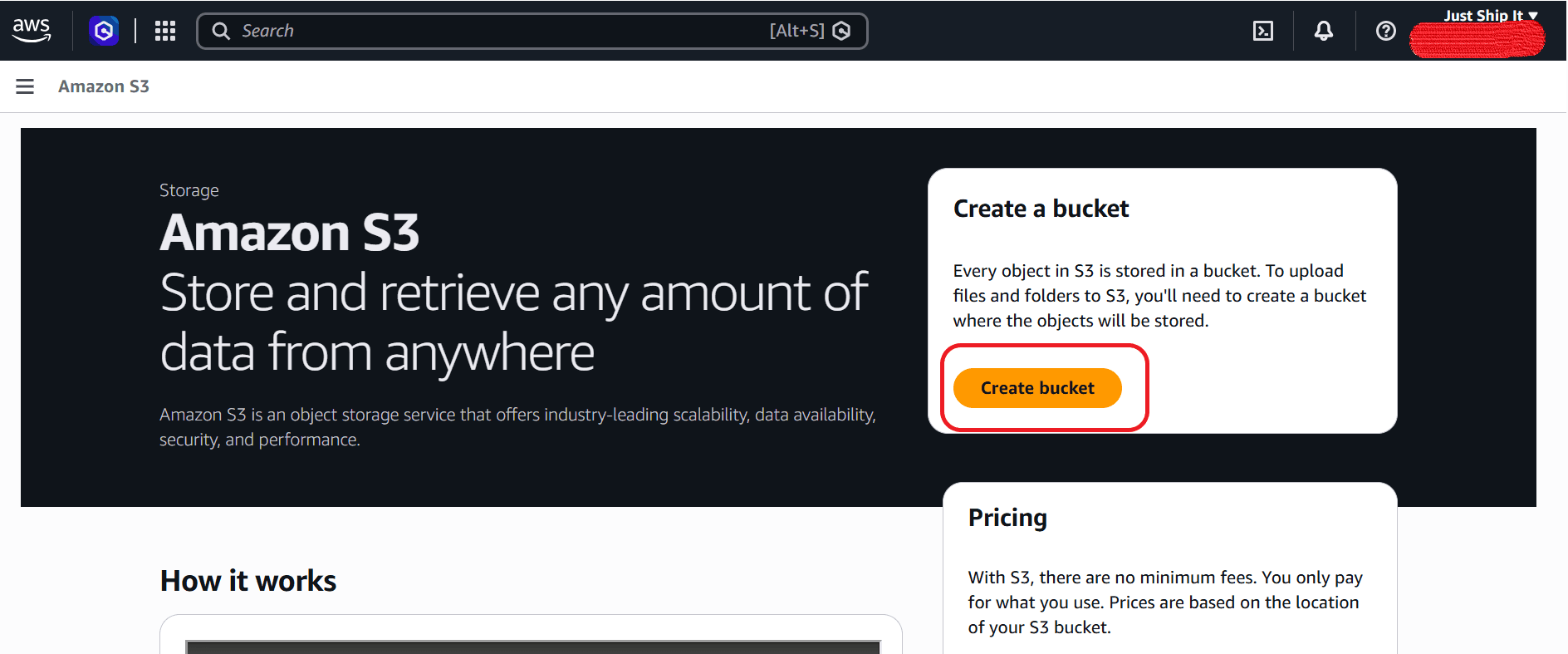
- Click ‘Create a bucket’ to create a bucket.
- Enter the bucket name.
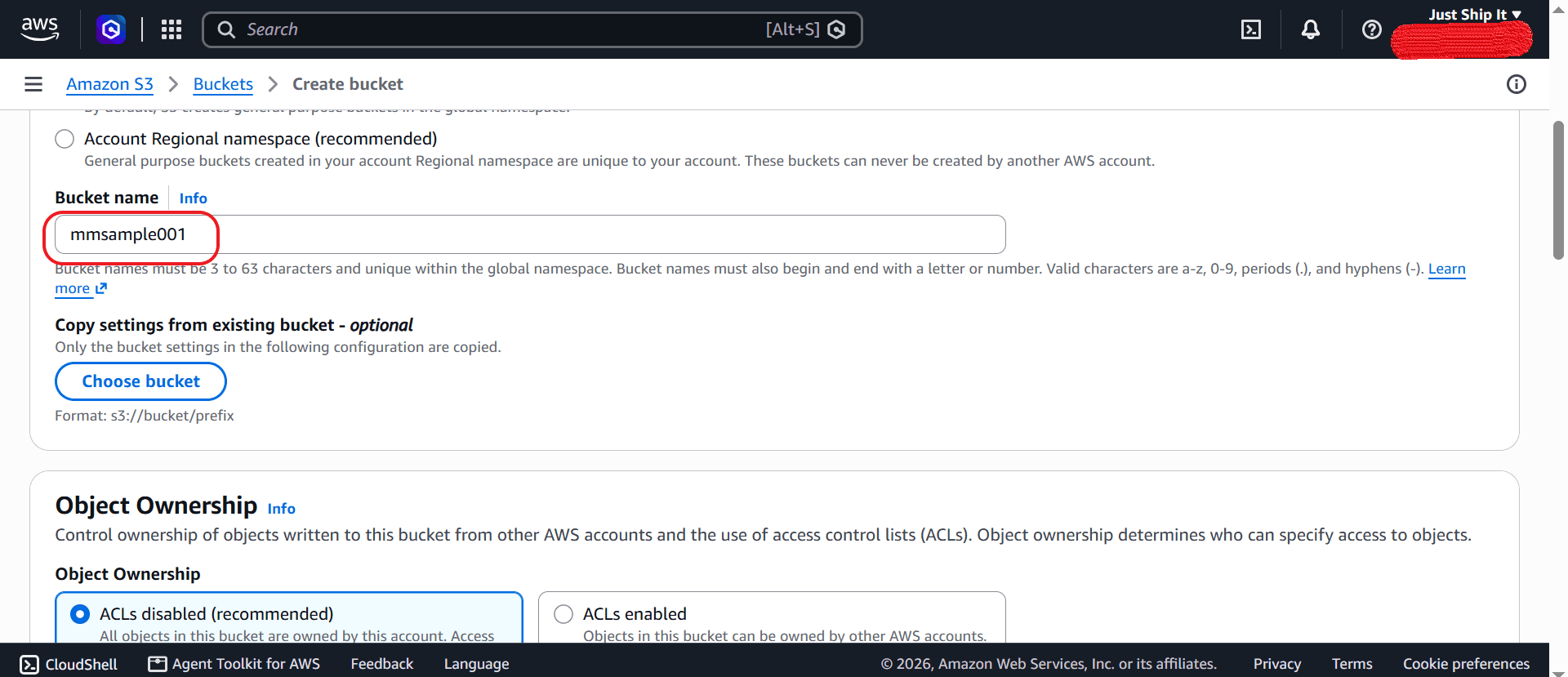
- Keep the default settings, then create the bucket.
- Your bucket is now created and ready for use.
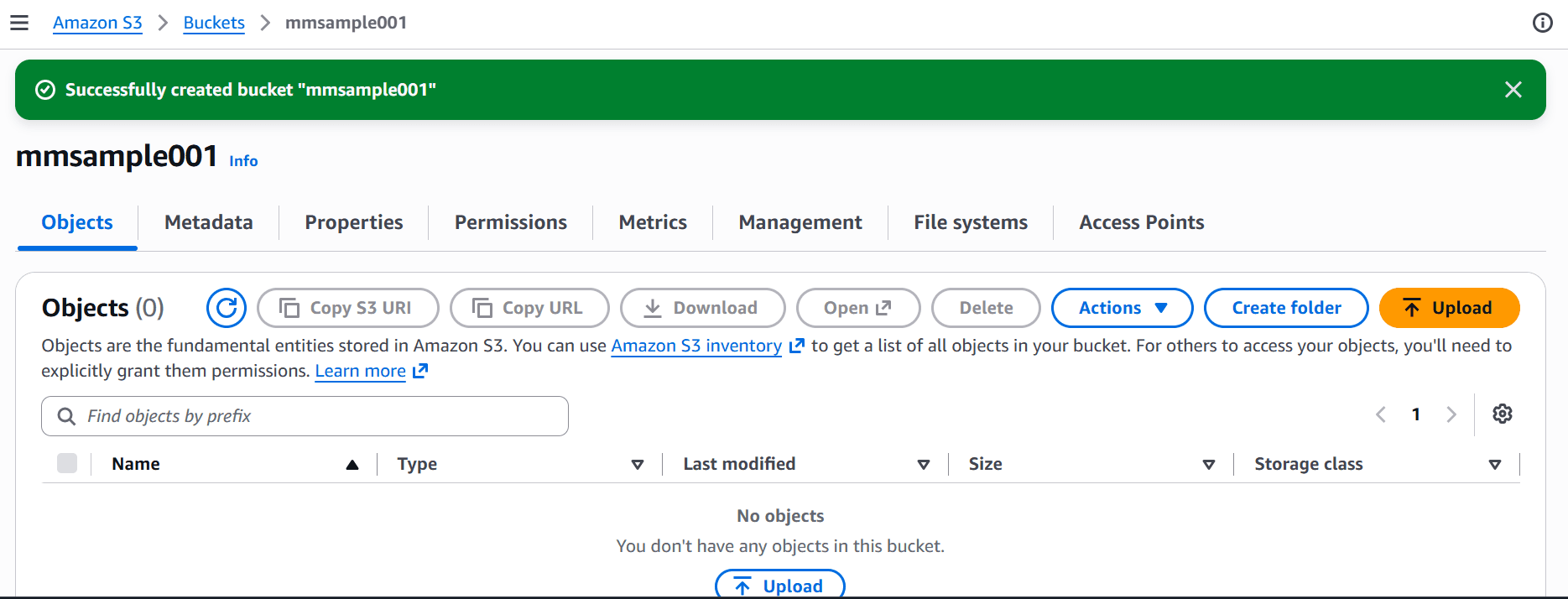
You have now built your AWS project by creating a bucket in Amazon S3.
AWS CLI Installation on Windows
We will walk through the steps to install AWS CLI on Windows. You need a Microsoft-supported 64-bit version of Windows.
Install AWS CLI
Let’s learn how to install AWS CLI using the ‘install script’ method.
- This method downloads, verifies, and installs the AWS CLI in a single step for the current user. Run the command below in PowerShell to install it.
irm https://awscli.amazonaws.com/v2/install.ps1 | iex- You can run the command below with the -System argument to install it for all users.
irm 'https://awscli.amazonaws.com/v2/install.ps1' -OutFile install.ps1; try { .\install.ps1 -System } finally { Remove-Item install.ps1 }- Run the command below to view the full list of options.
irm 'https://awscli.amazonaws.com/v2/install.ps1' -OutFile install.ps1; try { .\install.ps1 -Help } finally { Remove-Item install.ps1 }
- After installation, you can use the command below to update the AWS CLI to the latest version.
aws updateAWS CLI Installation on macOS
This section walks through installing the AWS CLI on macOS. You need a supported version of macOS 11 or later.
Installing the AWS CLI Using the Install Script Method
Run the following command to install the AWS CLI for the current user.
curl -fsSL https://awscli.amazonaws.com/v2/install.sh | bashTo install AWS CLI for all users, you need sudo and must pass the --system argument to the script.
curl -fsSL https://awscli.amazonaws.com/v2/install.sh | sudo bash -s -- --systemIf you want the full list of options, then run the script with --help
curl -fsSL https://awscli.amazonaws.com/v2/install.sh | bash -s -- --help
AWS Compute and Storage Services
Let’s go through some key AWS compute and storage services in this section.
1. Amazon EC2
Amazon Elastic Compute Cloud (Amazon EC2) provides resizable virtual servers in the AWS Cloud. Organisations can run applications using Amazon EC2 without purchasing or maintaining physical servers.
It can run your workloads on any processor type, including Intel, AMD, or ARM, based on your compute, storage, and networking needs. It can scale compute capacity up and down swiftly.
The key elements of Amazon EC2 include:
- EC2 Instances: Virtual servers you can use to run applications and workloads.
- Instance Types: Define an instance's compute, memory, storage, and networking capabilities.
- Amazon Machine Images (AMIs): Templates containing the operating system and configurations required to launch an instance.
- Auto Scaling: Automatically adjusts the number of EC2 instances based on demand.
- Elastic IP Addresses: Static public IPv4 addresses associated with AWS resources.
- Elastic Load Balancing (ELB): Distributes incoming traffic across multiple instances to improve availability and scalability.
2. Amazon S3
Amazon Simple Storage Service (Amazon S3) is an object storage service that organisations use to store and retrieve large amounts of data from anywhere. Amazon S3 offers high scalability, durability, security, and flexible storage options.
It helps organisations build data lakes, develop cloud-based applications, and run AI workloads on AWS. It can store virtually unlimited data at any time.
The key elements of Amazon S3 include:
- Buckets: Containers you can use to store objects in S3. Every bucket name is unique.
- Objects: Files and their metadata stored inside buckets.
- Encryption: S3 supports server-side encryption to protect stored data.
- Replication: S3 Replication can automatically copy objects between buckets, including across AWS Regions.
- Lifecycle rules: You can use them to automatically transition objects between storage classes or delete them based on defined rules.
- Static website hosting: S3 can host static website content such as HTML, CSS, JavaScript, and images.
3. Amazon VPC
Amazon Virtual Private Cloud (VPC) lets you create a logically isolated network within AWS to run and connect cloud resources securely. A VPC is a virtual network that resembles a traditional network.
The key components of Amazon VPC include:
- CIDR Block: Defines the IP address range of a VPC.
- Subnets: You can divide a VPC's IP address range into smaller networks called subnets. They can be public or private, depending on their routing configuration.
- Availability Zones: Subnets are created within specific Availability Zones to support fault isolation and high availability.
- VPC Peering: It connects two VPCs so resources can communicate using private IP addresses.
- Internet Gateway (IGW): It enables communication between resources in a VPC and the public internet.
- Route Tables: They determine how network traffic is directed between subnets and other destinations.
- NAT Gateway: It allows resources in private subnets to initiate outbound internet connections without accepting unsolicited inbound internet traffic.
- VPC Endpoints: They provide private connectivity from a VPC to supported AWS services without requiring an internet gateway or NAT gateway.
4. AWS Lambda
AWS Lambda is a serverless compute service that runs code in response to events. It eliminates the need for users to provision or manage servers. You can run code at any scale using AWS Lambda without managing infrastructure.
It also uses concurrent execution and automated global distribution to run standard HTTP servers directly.
The key components of AWS Lambda include:
- Lambda Functions: Units of code that can be executed in response to events or requests.
- Triggers: Events or requests that initiate Lambda function execution.
- Event-driven execution: Functions can be triggered by services such as Amazon S3, Amazon SQS, Amazon EventBridge, and Amazon API Gateway.
- Concurrency: It determines how many function executions can run simultaneously.
5. Amazon API Gateway
Amazon API Gateway is a fully managed AWS service. Organisations use this service to create, publish, secure, monitor, and maintain APIs at scale.
You can use this gateway to create RESTful APIs and WebSocket APIs to enable real-time two-way communication applications. This gateway lets applications communicate smoothly with backend services.
The key elements of Amazon API Gateway include:
- REST APIs: Support resource-based API development with features such as request validation, authentication, and API keys.
- WebSocket APIs: These APIs enable two-way communication between clients and backend services for real-time applications.
- HTTP APIs: Provide a lower-latency and cost-effective option for common HTTP workloads.
AWS Database Services
Let’s explore the key AWS database services in this section.
1. Amazon RDS
Amazon Relational Database Service (RDS) is a fully managed relational database service. This service is optimised for total cost of ownership.
It simplifies setting up, operating, and scaling relational databases in the cloud. It automates mundane tasks such as database provisioning, configuration, software patching, and backups.
The key features of Amazon RDS include:
- Multi-AZ Deployment: This feature helps maintain a standby database in another Availability Zone to support high availability and failover.
- Re-architecting: Amazon RDS can apply a lift-and-shift migration method with minimal code changes.
- Extensive database support: It supports multiple databases, including PostgreSQL, Oracle, and Db2.
2. Amazon Aurora
Amazon Aurora is a fully managed relational database engine in Amazon RDS. It is a high-performance storage subsystem. It automates database clustering and replication.
You can easily set up and operate a relational database in the cloud using Amazon Aurora. An Aurora cluster volume can scale up upto 256 terabytes.
The key features of AWS Aurora include:
- MySQL and PostgreSQL compatibility: AWS Aurora supports applications built for MySQL and PostgreSQL.
- Distributed Storage: It automatically replicates data across multiple Availability Zones.
- Serverless: It automatically adjusts database capacity based on application demand, helping manage variable workloads.
- Replicas: Aurora Replicas help scale read-intensive workloads and can support failover.
3. Amazon DynamoDB
Amazon DynamoDB is a fully managed and serverless NoSQL database service. It supports key-value and document data models. It also offers low-latency performance without requiring users to manage database servers.
It provides instant scaling, no cold starts, and pay-per-request billing. It is a highly scalable non-relational database service that overcomes the common data-storage scalability limitations.
The key components of DynamoDB include:
- Tables: Store items, and each item contains attributes.
- Items: An item can have any number of attributes.
- Data types: Amazon DynamoDB supports scalar, multi-valued, and document data types.
- Primary keys: DynamoDB supports partition keys and composite primary keys consisting of a partition key and a sort key.
- Secondary Indexes: Global Secondary Indexes (GSIs) and Local Secondary Indexes (LSIs) support additional query patterns.

Generative AI on AWS
Let’s explore AWS generative AI services.
1. Amazon Bedrock
Amazon Bedrock is a fully managed AWS service that provides access to foundation models (FMs) through a unified API. It enables you to build generative AI applications and agents without managing the underlying infrastructure.
You can use Amazon Bedrock to automate complex workflows and derive actionable insights by analysing data deeply. You can also use Amazon Bedrock AgentCore to build, connect, and optimise agents securely.
The key aspects of Amazon Bedrock include:
- Foundation models: Bedrock provides access to models from providers such as Amazon, Meta, Anthropic, and other supported partners.
- Guardrails: They prevent harmful content and identify model responses with high accuracy. They help minimise hallucinations and data ambiguity.
- Virtual assistants: They help decode user requests, break down tasks, and analyse multi-modal data.
2. Amazon SageMaker
Amazon SageMaker is a fully managed AWS service for building, training, and deploying machine learning (ML) models. It provides tools for data preparation, model development, experimentation, deployment, and MLOps.
You can reduce data silos and unify data with a lakehouse architecture. Amazon SageMaker also helps you prepare, analyse, and integrate data using Amazon Athena and AWS Glue.
The main elements of SageMaker include:
- SageMaker Studio: A web-based development environment for building and managing ML workflows.
- SageMaker JumpStart: Provides pre-trained and foundation models that you can adapt for specific use cases.
- SageMaker Catalog: Simplifies discovery and governance of your data, AI models, and dashboards.
- Model Monitoring: It helps detect issues such as data drift and changes in model performance after deployment.
3. AWS Nova Models
Amazon Nova is a family of text and multimodal foundation models developed by AWS. They can support tasks such as text generation, multimodal understanding, reasoning, and content generation.
The four Amazon Nova models include:
- Amazon Nova Micro: A text-only model you can use for applications that demand low latency and cost efficiency.
- Amazon Nova Pro: A multimodal model you can use for reasoning, content generation, analysis, and document exploration.
- Amazon Nova Lite: A fast, cost-efficient multimodal model that can process text and visual inputs.
- Amazon Nova Premier: A powerful multimodal model that can comprehend various inputs, including text, images, video, and code.
4. Serverless RAG on AWS
This architecture combines retrieval-augmented generation (RAG) with managed AWS services to build AI applications. It retrieves relevant information from private data sources and uses it to generate context-aware answers.
AWS Monitoring and Audit Services
This section explores AWS monitoring and audit services.
1. Amazon CloudWatch
Amazon CloudWatch is an AWS monitoring and observability service. You can observe and optimise your workloads using this service.
This service collects and visualises metrics, logs, and traces across your AWS environment. This gives you enhanced visibility into resource usage, application performance, and operational health.
The key features of Amazon CloudWatch include:
- Logs: It collects and stores application and service logs in CloudWatch Logs for troubleshooting and analysis.
- CloudWatch Omni: An agent-based observation tool you can use to trace execution paths, run evaluations, and test model configurations.
- CloudWatch Agent: It collects system-level metrics and logs from EC2 instances and on-premises servers.
- CloudWatch Logs Insights: It enables interactive querying and analysis of log data.
2. Amazon EventBridge
Amazon EventBridge is a serverless event bus service that connects application components using events. This lets you build event-driven architectures at scale.
It provides two event buses: a custom event bus and a custom event bus (classic). They help build applications quickly.
The key components of Amazon EventBridge include:
- Events: An event is a JSON-formatted record. It can be an S3 object upload or an EC2 instance state change.
- Custom Event Bus: Receives and routes events to subscribers that you create and supports non-JSON payloads.
- Custom Event Bus:Classic: Routes events using rules and targets.
- EventBridge Scheduler: Lets you create, run, and manage tasks from a managed service.
3. AWS CloudTrail
AWS CloudTrail is an AWS service that you can use to perform operational and risk auditing. It helps you meet compliance requirements, ensure security, and investigate operational issues.
It records and monitors user activity and API calls across an AWS account as events. Events can include actions taken in the AWS Management Console, AWS SDKs, and APIs.
The key aspects of AWS CloudTrail include:
- Event History: Provides a searchable history of management events from the last 90 days in a Region.
- Trails: Deliver event logs to Amazon S3 for long-term storage and auditing.
- Management Events: They record control-plane operations, such as creating an EC2 instance or modifying an IAM policy.
- CloudTrail Lake: It supports collecting, querying, storing, and analysing audit events using SQL.
AWS Infrastructure as Code (IaC) Services
Here are some key AWS IaC services:
1. AWS CloudFormation
AWS CloudFormation is an infrastructure as code (IaC) service. It allows you to create, manage, and provision AWS resources automatically using templates written in YAML or JSON.
It helps manage resources with a single operation across all your AWS accounts and regions. It automates resource management wth turnkey application distribution and governance controls.
The key components of AWS CloudFormation include:
- Templates: They define AWS infrastructure resources, configurations, and dependencies using YAML or JSON.
- Stacks: A collection of AWS resources managed as a single unit.
- Drift detection: The process of identifying differences between the resources in a stack and their expected configurations.
2. AWS CDK (Cloud Development Kit)
AWS Cloud Development Kit (AWS CDK) is an open-source Infrastructure as Code (IaC) framework. It lets you define and provision AWS infrastructure using programming languages instead of YAML or JSON.
You can simplify AWS onboarding with constructs that preconfigure cloud resources. This service helps design and share reusable components to meet your organisation’s security and compliance requirements.
The key aspects of AWS CDK include:
- Stacks: They group related AWS resources into deployable units.
- CDK CLI: It provides commands to initialise projects, compare changes, synthesise templates, and deploy stacks.
- Synthesis: It converts CDK code into AWS CloudFormation templates.
AWS Security
Let’s learn the crucial AWS security services:
1. AWS IAM
AWS IAM is an AWS service that controls who can access AWS resources and what actions they can perform. It helps organisations implement authorisation, authentication, and least-privilege access.
It lets you create granular permissions based on user attributes using attribute-based access control. You can use service control policies to create guardrails for IAM roles.
Key components of AWS IAM include:
- IAM users: Identities for individual users or applications that need AWS access.
- IAM roles: Identities with temporary credentials that applications, users, or AWS services can assume.
- IAM groups: Collections of IAM users that can share common permissions.
- IAM policies: JSON documents that define allowed or denied actions on AWS resources.
- Multi-factor authentication (MFA): An approach that adds an authentication factor to strengthen account security.
2. AWS KMS
AWS Key Management Service (AWS KMS) is a managed AWS service that organisations can use to create, control, and manage cryptographic keys to encrypt and protect data across AWS services and applications.
This service lets you perform signing operations with asymmetric key pairs so you can easily validate digital signatures.
The key components of AWS KMS include:
- Encryption Keys: Cryptographic keys used to encrypt and decrypt data.
- Customer Managed Keys: They give organisations greater control over key policies, rotation, permissions, and lifecycle management.
- KMS Keys: They provide centrally managed keys, including AWS-managed, AWS-owned, and customer-managed keys.
3. AWS Organizations
AWS Organizations is an AWS service that helps organisations centrally manage multiple AWS accounts. It provides account grouping, consolidated billing, governance, and policy-based controls.
It helps you organise AWS accounts, ensure security, and enforce budgetary controls. It simplifies billing and helps companies reduce costs significantly.
The key elements of AWS organizations include:
- Management Account: The central account used to create and manage the organisation.
- Organisational Units (OUs): Groups of related AWS accounts so you can apply policies and controls collectively.
- Member accounts: AWS accounts managed within the organisation.
- Service Control Policies (SCPs): They set permission guardrails that define the maximum permissions available to accounts or OUs.
Explore Top AWS Interview Questions and Answers
AWS Pricing
Let’s understand the AWS pricing details here:
- AWS Free Tier: The benefits of the AWS Free Tier include:
- The free tier provides eligible users with upto $200 in credits.
- You can use selected services at no cost, subject to applicable limits.
- AWS Paid Plans: You can pay for AWS services in the following ways.
- Pay-as-you-go: In this plan, you pay for services based on your usage. It reduces the risk of overprovisioning or underprovisioning.
- Flat rate: This plan combines the prices of multiple AWS accounts into a single entity, with no overage charges.
- Pay less by using more: With this plan, users can get discounts as usage increases. Simply put, the more you use AWS services, the lower the per-GB cost.
- Save when you commit: With this plan, you can save on committed usage of AWS services for a one-year or three-year period.
AWS Certification Path
The table below shows the AWS-based job roles and the associated AWS certifications.
| Role | Certifications |
| Beginners | AWS Certified Cloud Practitioner (CLF-C02) |
| AI Engineer |
AWS Certified AI Practitioner (AIF-C01) AWS Certified Machine Learning Engineer – Associate (MLA-C02) AWS Certified Generative AI Developer – Professional (AIP-C01) |
| Cloud Architect | |
| Cloud Architect | |
| Application Developer | AWS Certified Developer – Associate (DVA-C02) |
| Cloud Administrator | AWS Certified CloudOps Engineer – Associate (SOA-C03) |
| DevOps Engineer | AWS Certified DevOps Engineer – Professional (DOP-C02) |
| Cloud Security | AWS Certified Security – Speciality (SCS-C03) |
| Cloud Networking Engineer | AWS Certified Advanced Networking – Speciality (ANS-C01) |
Choose the certification that aligns with your role and career goals. Structured training can help you prepare for certification exams. MindMajix offers AWS courses for beginners and professionals to help you advance your career.
Frequently Asked Questions
1. Are AWS services free?
Some AWS services offer a Free Tier with limitations, while other services charge based on usage.
2. What is the difference between Amazon EC2 and AWS Lambda?
Amazon EC2 provides virtual servers that you can configure and manage. AWS Lambda, on the other hand, runs code in response to events without requiring users to manage servers.
3. What are the commonly used AWS services?
Commonly used AWS services include Amazon EC2, Amazon CloudWatch, Amazon S3, AWS Lambda, Amazon VPC, Amazon RDS, AWS IAM, and AWS CloudTrail.
4. How long does it take to learn AWS?
The time depends on your prior cloud computing experience. A beginner may need a few weeks to understand AWS fundamentals, then gradually build proficiency in AWS services over a few months. MindMajix offers a 25-hour AWS course that helps you explore AWS services quickly.
Conclusion
In summary, this tutorial covered AWS services, AWS CLI installation, and access to the AWS Management Console. We hope this AWS guide has helped you better understand AWS services.
If you want to learn more about AWS, you can join an AWS course at MindMajix. It can help you build a deeper understanding of AWS and unlock career prospects in cloud computing.
 On-Job Support Service
Online Work Support for your on-job roles.

Our work-support plans provide precise options as per your project tasks. Whether you are a newbie or an experienced professional seeking assistance in completing project tasks, we are here with the following plans to meet your custom needs:
- Pay Per Hour
- Pay Per Week
- Monthly
| Name | Dates | |
|---|---|---|
| AWS Training | Nov 07 to Nov 22 | View Details |
| AWS Training | Nov 10 to Nov 25 | View Details |
| AWS Training | Nov 14 to Nov 29 | View Details |
| AWS Training | Nov 17 to Dec 02 | View Details |

Mohammed Zaid is a technical content creator and digital marketer with good experience in translating complex technologies into accessible insights. He specializes in writing expert articles on Agentic AI, Generative AI, LLMs, data strategy, and cloud computing for a global audience.


