- Home
- Blog
- Kubernetes
- Kubernetes (K8s) Tutorial

- Kubernetes Architecture
- Kubernetes Deployment Vs Kubernetes Services
- Kubernetes Ingress
- Kubernetes Interview Questions
- Kubernetes Load Balancer Services
- Kubernetes Vs Docker swarm
- Kubernetes Vs Openshift
- Kubernetes Overview
- Detailed Study On Kubernetes Dashboard
- What is Kubernetes?
- Cloud Deployment Models
- Fluentd Kubernetes
- Kubernetes Tools
- Kubernetes Projects and Use Cases
- How To Install Kubernetes on Ubuntu?
- Installing Kubeadm
- Kubernetes Secrets
- Kubernetes Storage Class
- Kubernetes Deployment YAML
- Install Kubernetes on Windows
- Kubernetes VS Openstack
- Kubectl Connect to Cluster
- Kubernetes Vs Terraform
- ECS Vs Kubernetes
- Kubernetes Pod Vs Node
- Kubernetes vs Alternatives: ECS, OpenShift, Terraform
- Kubernetes Dashboard to Headlamp
Managing and scaling containerised applications across complex IT environments can be challenging. Kubernetes (K8s), a container orchestration platform, addresses these challenges by automating container deployment, scaling, networking, load balancing, and self-healing.
If you want to gain a comprehensive understanding of kubernetes platform, you cannot miss learning kubernetes architecture, its components and the deployment of AI/ML workloads.
Table of Contents
- What is Kubernetes (K8s)?
- Kubernetes Architecture
- Core Concepts
- Local Setup with Minikube and kind
- kubectl Fundamentals
- Gateway API
- Role-Based Access Control (RBAC)
- Kubernetes Observability
- Helm
- GitOps
- DRA and AI/ML Workloads
- Conclusion
What is Kubernetes (K8s)?
Kubernetes (K8s) is an open-source platform for deploying, scaling, and automating containerised applications. The latest Kubernetes release is v1.37.0, as of 26 August 2026.
Kubernetes is extensively used in microservices, DevOps, and CI/CD environments. The key components of Kubernetes are the cluster, nodes, pods, namespaces, services, and the control plane.
By using Kubernetes, you can:
- Manage containers created using Docker.
- Deploy applications across multiple servers.
- Automatically scale application instances up or down.
- Restart failed containers and replace unhealthy instances.
- Distribute network traffic across application instances.
- Update applications with minimal or no downtime.
- Keep applications running even when individual nodes fail.
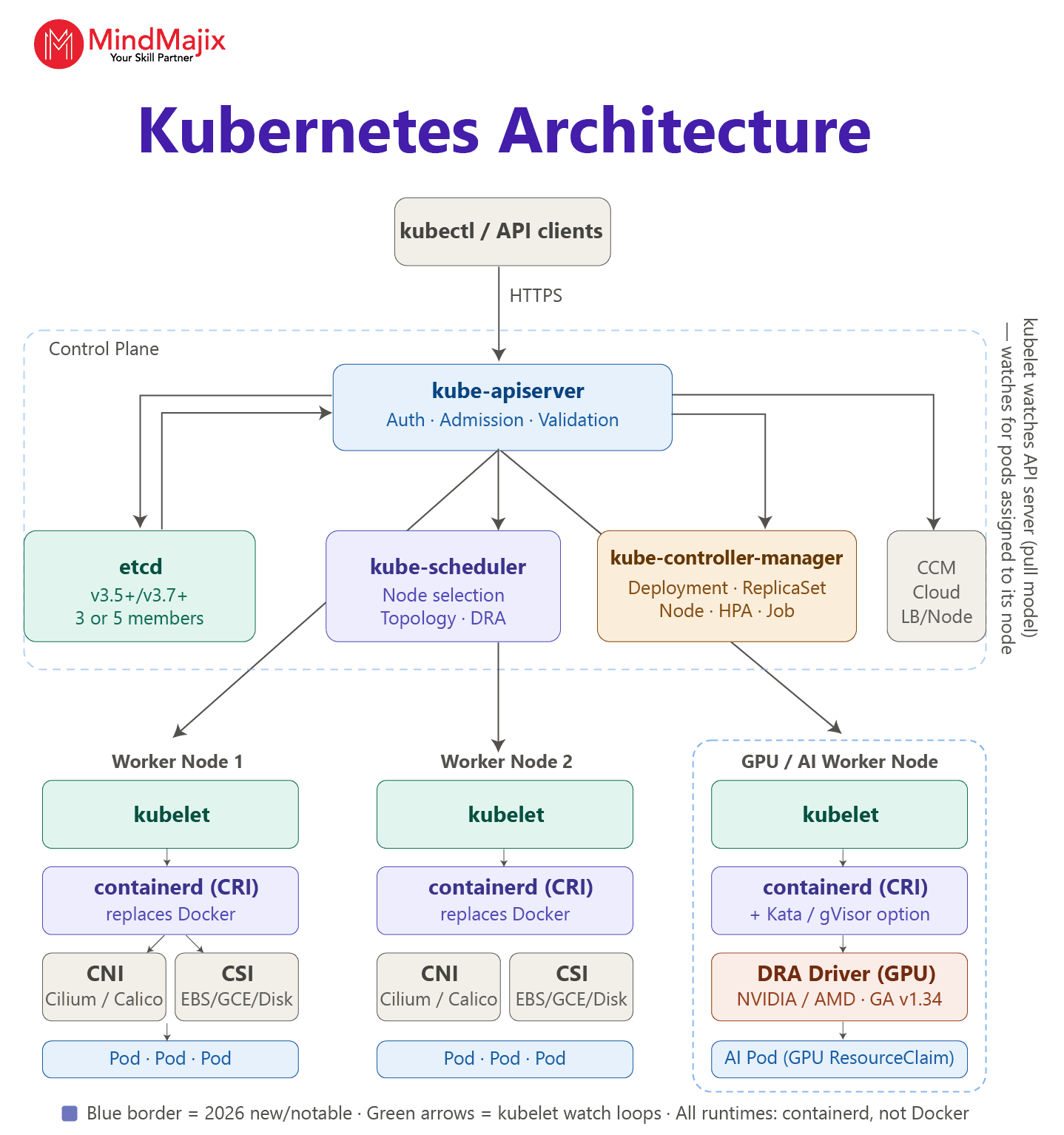
Kubernetes Architecture - An Overview
Kubernetes architecture consists of a control plane and one or more worker nodes. Together, they run and manage containerised applications efficiently.
Let’s discuss the control plane and worker nodes.
1. Control Plane
The control plane manages the Kubernetes cluster. It has the following key components, which are crucial for cluster control and scheduling.
- kube-apiserver: It acts as the front end of the Kubernetes cluster. It manages API requests from users and tools.
- etcd: A distributed key-value store that maintains cluster configuration and metadata.
- kube-scheduler: It assigns newly created Pods to worker nodes based on resources, constraints, and scheduling rules.
- kube-controller-manager: It runs various controllers that continuously check the cluster and maintain the desired state.
- Admission Controller: A webhook layer that intercepts API requests after authentication or authorisation. It can validate or modify requests through validating or mutating webhooks.
2. Worker Node
A worker node hosts Pods that are the components of the application workload.
Let’s understand the components of a worker node.
- Kubelet: It communicates with the control plane and ensures Pods run correctly.
- Container Runtime (CRI): It runs containers, such as containerd or CRI-O.
- Kube-proxy: It helps manage network communication and service traffic.
- Pod: The smallest deployable unit in Kubernetes. It contains one or more containers.
3. Cluster Add-ons
- CoreDNS: It provides DNS-based service discovery, allowing Pods to find Kubernetes services by name.
- Metrics Server / Metrics API: It collects resource usage metrics such as CPU and memory from nodes and Pods.
- Container Network Interface (CNI) Plugin: It provides network connectivity for Pods. It assigns IP addresses to Pods and enables communication between Pods, nodes, and external networks.
- Container Storage Interface (CSI) Driver: It provides storage integration for Kubernetes. It allows Pods to dynamically provision, attach, mount, and manage persistent storage.
- Cloud Controller Manager: It connects Kubernetes with cloud providers.
Kubernetes Core Concepts
- Pod: The smallest deployable unit in Kubernetes. It contains one or more containers that share networking and storage resources.
- Node: A worker machine that runs Pods, virtually or physically. It contains components such as the kubelet, container runtime, and more.
- Namespace: It provides logical isolation within a Kubernetes cluster. It helps organise and manage resources for different teams, applications, or environments. Namespaces are the foundation of multi-tenancy, resource isolation, and RBAC scoping.
- Labels: Key-value pairs that help identify, organise, and select resources.
- Deployments: They manage the deployment of Pods. They ensure the desired number of application instances are running and support rolling updates and rollbacks.
- ReplicaSets: They ensure a specified number of identical Pod replicas are running at any time. If a Pod fails, they create a new one.
- ClusterIP: It exposes a service inside the Kubernetes cluster. It is the default Service type used for communication between applications within the cluster.
- NodePort: It exposes a Service through a static port on each Node. It allows external clients to access the application using
NodeIP:NodePort. - LoadBalancer: A built-in service type that exposes applications to the internet by automatically provisioning a load balancer outside the cluster.
Local Setup with Minikube or kind
You can use Minikube and Kubernetes IN Docker (kind) to run a Kubernetes cluster locally.
Minikube is a beginner-friendly tool that runs a local Kubernetes cluster using a virtual machine or container runtime. kind is a lightweight tool that you can use to run local Kubernetes clusters using Docker containers as nodes.
1. Minikube Setup
The following are the required prerequisites for this installation:
- At least 2 CPUs
- 2 GB of free RAM
- 20 GB of free disk space.
Windows Setup
To install the latest stable Minikube release on Windows x86-64 systems using the .exe installer, follow the steps below.
- Download and run the installer for the latest Minikube version.
- Add the
minikube.exebinary to your PATH and run PowerShell as an administrator.
$oldPath = [Environment]::GetEnvironmentVariable('Path', [EnvironmentVariableTarget]::Machine)
if ($oldPath.Split(';') -inotcontains 'C:\minikube'){
  [Environment]::SetEnvironmentVariable('Path', $('{0};C:\minikube' -f $oldPath), [EnvironmentVariableTarget]::Machine)
}
Linux Setup
To install the latest stable Minikube release on Linux x86-64 systems using the binary distribution, use the command below:
curl -LO https://github.com/kubernetes/minikube/releases/latest/download/minikube-linux-amd64
sudo install minikube-linux-amd64 /usr/local/bin/minikube && rm minikube-linux-amd64
MacOS Setup
To install the latest stable Minikube release on macOS x86-64 systems using the binary distribution, use the following command:
curl -LO https://github.com/kubernetes/minikube/releases/latest/download/minikube-darwin-amd64
sudo install minikube-darwin-amd64 /usr/local/bin/minikube
Below are the basic Minikube commands:
- minikube start
- kubectl get nodes
- minikube status
- minikube stop.
2. Kind Setup
The following are the prerequisites for this installation:
- Go 1.17 or later
- Docker, Podman, or nerdctl.
Then, run the following command to install kind:
go install sigs.k8s.io/kind@v0.33.0 && kind create clusterkubectl Fundamentals
The following are some of the kubectl commands:
- kubectl get: It lists Kubernetes resources such as Pods, Services, and Nodes.
- kubectl describe: It shows detailed information about a resource, including events.
- kubectl apply: It creates or updates resources using a YAML/JSON configuration file.
- kubectl delete: It deletes Kubernetes resources.
- kubectl logs: It displays logs generated by a container in a Pod.
- kubectl exec: It executes a command inside a running container.
- kubectl port-forward: It creates a temporary connection from your local machine to a Pod or Service in a Kubernetes cluster.
- kubectl explain: It displays documentation for Kubernetes resource fields. It is useful when writing or understanding YAML manifests.
- kubectl scale: It changes the number of replicas for a workload.
- kubectl rollout: It manages and monitors deployment updates and rollbacks.
- kubectl config: It manages Kubernetes contexts, clusters, and credentials.
Gateway API
Gateway API is a Kubernetes project that replaces the traditional ingress API. It also offers a more expressive way to manage traffic entering and moving within a kubernetes cluster.
Let’s take a look at the components of the Gateway API below:
- GatewayClass: It defines the type of Gateway implementation used by a cluster.
- Gateway: It represents a network entry point that listens for incoming traffic.
- HTTPRoute: It defines HTTP/HTTPS routing rules to backend Services.
- GRPCRoute: It defines routing rules for gRPC traffic.
- ReferenceGrant: It controls when resources in one namespace can reference resources in another namespace.
Envoy Gateway and NGINX Gateway Fabric are implementations that use the Kubernetes Gateway API to manage and route application traffic.
The two implementations include:
- Envoy Gateway: A Kubernetes-native Gateway API implementation that simplifies configuring and operating Envoy for an API gateway.
- NGINX Gateway Fabric: Another Kubernetes Gateway API implementation that uses NGINX as the data plane proxy. It enables Gateway API resources to configure NGINX for traffic management.
Role-Based Access Control (RBAC)
RBAC is a Kubernetes security mechanism that controls what users can do with resources in a cluster.
The RBAC components are:
- Role: It defines permissions within a specific namespace, such as allowing users to view or modify Pods.
- ClusterRole: It defines permissions that can apply across the cluster, including cluster-scoped resources.
- RoleBinding: It grants a Role or ClusterRole to users, groups, or ServiceAccounts within a namespace.
- ClusterRoleBinding: It grants a ClusterRole across the entire cluster.
- ServiceAccount: It provides an identity for applications or workloads running inside Kubernetes.

Kubernetes Observability
Observability helps you understand the health, performance, and behaviour of applications and Kubernetes clusters through metrics, logs, and traces.
- Prometheus: An open-source monitoring and metrics collection system. It collects time-series metrics from Kubernetes and applications and triggers alerts using PromQL and Alertmanager.
- Grafana: An observability and visualisation platform you can use to create dashboards and visualise metrics collected from Prometheus and other data sources.
- OpenTelemetry (OTel): An open-source observability framework that you can use to collect and export metrics, logs, and distributed traces from applications and infrastructure.
- Kubernetes Metrics API: It provides basic resource usage metrics, including CPU and memory consumed by nodes and Pods. The Horizontal Pod Autoscaler (HPA) uses it to scale workloads based on resource utilisation.
- Kubernetes Logging Pipeline: It collects, processes, and sends logs to a central logging backend for storage, searching, and analysis. The pipeline collects logs from Kubernetes workloads.
- Fluent Bit - A lightweight log collector and processor designed for Kubernetes.
- Fluentd - Another log collector and processor with a large ecosystem of plugins and flexibility.
Helm (Package Manager)
Helm is a Kubernetes package manager that simplifies installing, configuring, and managing Kubernetes applications.
The key Helm concepts include:
- Helm Chart: A package that contains Kubernetes resource definitions and configuration files for a Kubernetes application.
- Release: A specific instance of a Helm chart installed in a Kubernetes cluster.
- Repository: A location where you can store Helm charts.
- Values: They are configuration parameters that you can use to customise a Helm chart without changing its templates.
GitOps
GitOps is a Kubernetes deployment approach where Git acts as the source of truth for application configuration and infrastructure. A GitOps controller compares the desired state in Git with the actual cluster state and reconciles differences as needed.
- Argo CD: A declarative GitOps continuous delivery tool for Kubernetes. It continuously monitors Git and synchronises applications with the cluster.
- Flux: A GitOps toolkit that continuously reconciles Kubernetes resources with configuration stored in Git. It supports Helm and other deployment workflows.
Prepare Kubernetes Interview Questions With Answers
DRA and AI/ML Workloads
Now, we will take a close look at the role of DRA and AI/ML workloads in kubernetes.
1. Dynamic Resource Allocation (DRA)
DRA is a Kubernetes mechanism that you can use to allocate specialised hardware resources to workloads dynamically. It is particularly useful for AI/ML workloads that require GPUs, accelerators, FPGAs, or other specialised devices.
2. AI/ML Workloads in Kubernetes
You can use Kubernetes to deploy, scale, and manage AI/ML workloads, which include:
- GPU/accelerator scheduling for model training and inference.
- DRA for flexible allocation of specialised devices.
- Auto-scaling for variable inference workloads.
- Run distributed workloads across multiple Pods and Nodes.
Conclusion
In summary, you have learned Kubernetes' key features and capabilities, architecture, deployment, kubectl, the Gateway API, and many other key topics. You should now have a clear understanding of Kubernetes orchestration capabilities and why they are crucial for modern cloud-native application management. If you want to explore more about Kubernetes, you can join the Kubernetes course by MindMajix. This will help you gain a deep understanding of the platform.
 On-Job Support Service
Online Work Support for your on-job roles.

Our work-support plans provide precise options as per your project tasks. Whether you are a newbie or an experienced professional seeking assistance in completing project tasks, we are here with the following plans to meet your custom needs:
- Pay Per Hour
- Pay Per Week
- Monthly
| Name | Dates | |
|---|---|---|
| Kubernetes Training | Nov 07 to Nov 22 | View Details |
| Kubernetes Training | Nov 10 to Nov 25 | View Details |
| Kubernetes Training | Nov 14 to Nov 29 | View Details |
| Kubernetes Training | Nov 17 to Dec 02 | View Details |

Suneel, a Technology Architect with a decade of experience in various tech verticals like BPM, BAM, RPA, cybersecurity, cloud computing, cloud integration, software development, MERN Stack, and containerization (Kubernetes) apps, is dedicated to simplifying complex IT concepts in his articles with examples. Suneel's writing offers clear and engaging insights, making IT accessible to every tech enthusiast and career aspirant. His passion for technology and writing guides you with the latest innovations and technologies in his expertise. You can reach Suneel on LinkedIn and Twitter.


